
Achieving validation through GuideStar enhances your charity’s credibility and visibility. It reassures donors and stakeholders of its legal compliance and ethical standing, potentially increasing funding opportunities. This guide will help you make the most of your GuideStar profile.
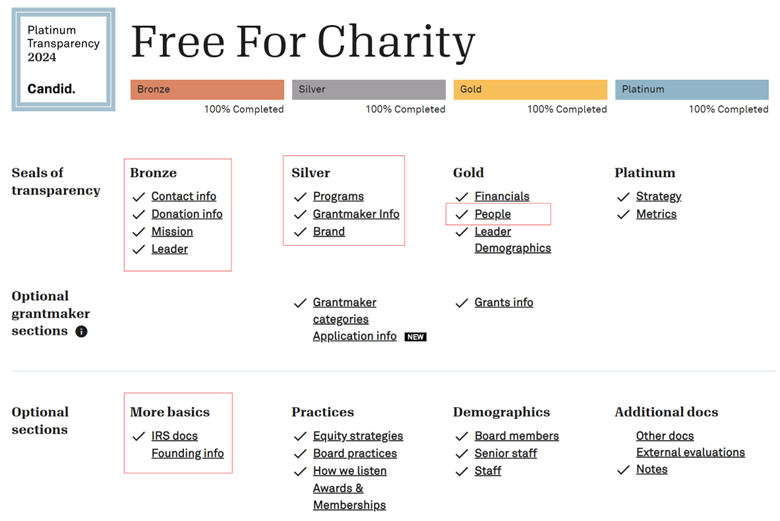
GuideStar is the main tool for helping you gather the information to complete our onboarding form. Your goal should be to reach the highest level of completion (GuideStar Platinum). Get the highest level you can with the data you have. It takes roughly 2–3 hours to fully reach Platinum the first time and then 30 minutes a year to keep it updated. To be supported by Free For Charity, we require organizations to be at least Gold and to upload info for your board and IRS Designation Documents. See the highlighted areas below.
NOTE: If you nonprofit is alreay claimed then the current management has to “Add Managers” to allow your email to update the profie.
Once you have published your report you will then be given a link to share your profile as well as some option for posting this badge to your website that we will need later.
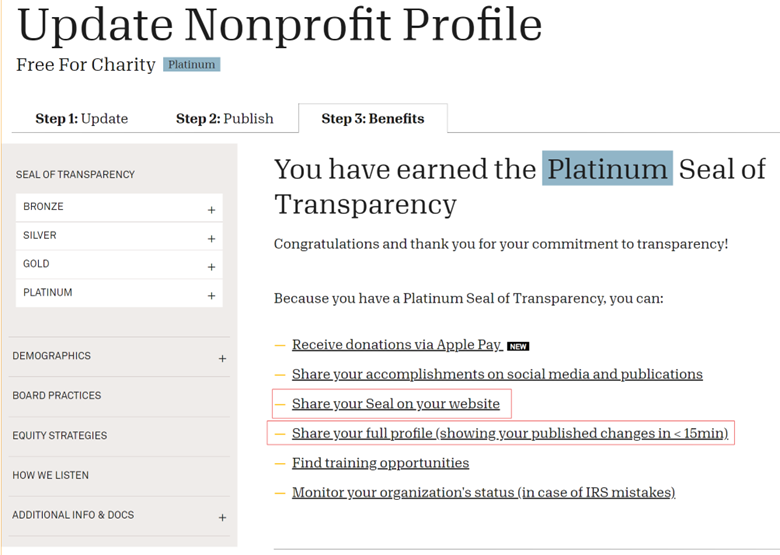
Here is an example of the links to copy into the FFC onboarding form:
(These are examples only, please copy the links from your GuideStar profile.)
FFC ‘Full Profile’ GuideStar Link:
https://www.guidestar.org/profile/shared/bbbe173a-87b9-4af9-a8a2-cae255a95742FFC ‘Public Profile’ GuideStar Link:
https://www.guidestar.org/profile/46-2471893FFC GuideStar Seal Code (This isn’t needed for the onboarding form, but will be needed later):
Please keep your GuideStar profile handy while filling out the FFC onboarding form. A significant portion of the information we require can be copied over from what you provided to GuideStar while achieving your Seal of Transparency.
Clarke Moyer (520) 222-8104